
All the hard work you put into livestreaming or managing hosts on Recho Live deserves a quick, hassle-free payout. Understanding the recho live withdraw process ensures you receive your hard-earned earnings without unexpected delays. This guide breaks down the rules, withdraw steps, supported payment channels, and solutions to common transfer issues.
Recho Live Withdraw Requirements
Before submitting a withdrawal request, ensure your account fulfills these four criteria:
- Completed Face Verification: Mandatory for all users. Hosts must complete face scanning before streaming, while agents must finish verification before initiating any withdrawal.
- Verified Contact Information: Your Recho Live profile must be linked to an active email address or phone number for security authorization.
- Minimum Balance Threshold: You must accumulate a minimum earnings balance of $10 USD before requesting a withdrawal.
- Active Payment Account: Ensure your chosen receiving account (bank or e-wallet) is open, verified, and capable of receiving external deposits.
Step-by-Step Recho Live Withdraw Tutorial
Follow these steps to transfer your wallet earnings to your personal account:
- Log in to Recho Live: Open the official Recho Live app on your device and sign in to your verified host or agent account.
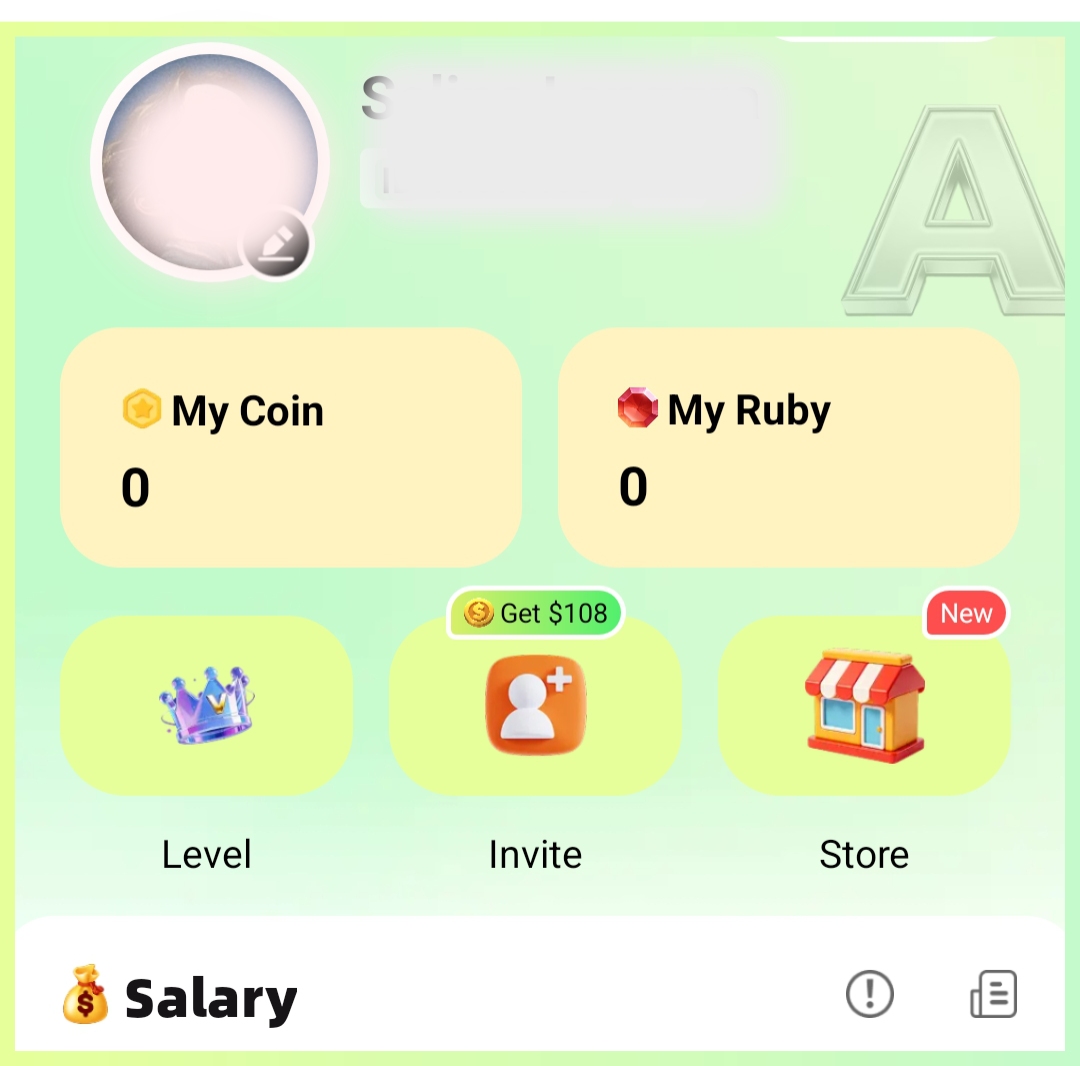
- Access Your Wallet: Tap your profile icon at the bottom of the screen and select “My Coin” to check your available coin balance.
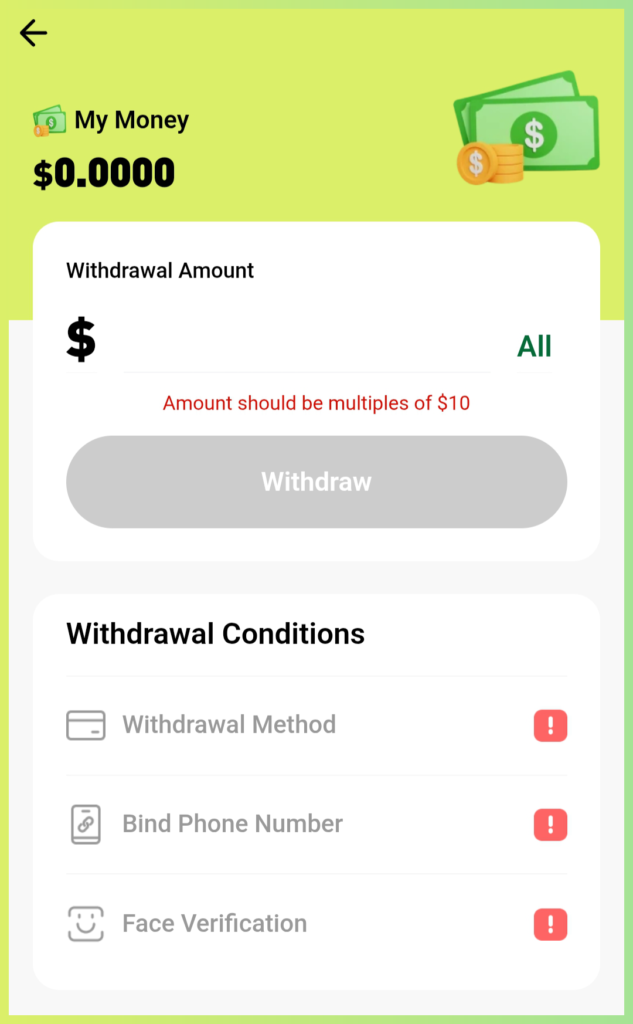
- Open the Withdraw Menu: Inside the wallet screen, tap the “Withdraw” button.
- Verify Identity & Bind Epay: If this is your first withdrawal, complete the brief phone verification, face scan, and link your Epay account details.
- Submit the Amount: Enter the exact dollar amount you wish to transfer, verify the receiving account info, and tap submit to finalize the transfer.
Frequently Asked Questions (FAQs)
What is the minimum payout limit for a Recho Live withdraw?
The platform allows you to cash out once your available balance reaches at least $10 USD.
What payment options are supported?
Recho Live via Epay supports Epay, USDT cryptocurrency, PayPal, direct local bank transfers, and regional e-wallets. Available methods depend on your geographic location.
Are there processing fees when withdrawing?
Recho Live does not charge unexpected hidden fees, but third-party payment processors or banks may charge independent transfer fees. Always review provider fees before completing your transaction.
Can hosts initiate their own withdrawals?
Yes. Hosts maintain full administrative control over their personal wallets and can request payouts independently at any time.
What should I do if I connected the wrong payout details?
You can unlink or update your receiving account details directly within the app settings at any time before submitting a new payout request.
Troubleshooting Common Recho Live Withdraw Errors
- Failed Transactions: Payout failures usually come from incorrect account numbers, unverified identity status, or inactive receiving accounts. Double-check your payment information or switch to an alternate transfer method.
- Missing Payment Methods: Payment options are region-specific. If a particular service is not visible in your app, select an alternate method currently active in your country.
- Extended Payout Delays: Standard withdrawal processing takes up to three business days. If your withdrawal remains pending past this timeframe, contact official customer support for manual account review.
Final Thoughts
Withdrawing your earnings on Recho Live is straightforward once your identity details and receiving accounts are properly verified. Whether you operate as an individual host or an agency, taking a few minutes to confirm your payment details prevents processing delays. For further account setup guides or payment assistance, reach out to our Recho Live support team or browse our latest creator guides right here.